Let AI talk to your web app.
From prompt to reusable flow.
TAMASH is a Chrome extension for WebMCP tool validation, Web AI agent execution, and reusable flows. Use the Agent tab for plain-English runs, Tool Tester for per-tool validation, and the Flow tab to replay saved sequences without any AI.
Can't access the Chrome Web Store? Download the extension package, extract it, open chrome://extensions/, enable Developer mode, then click Load unpacked.
What is TAMASH?
One extension. Four purpose-built tabs.
Install TAMASH once from the Chrome Web Store and get four distinct ways to work with any WebMCP-enabled web application — all from a single Chrome side panel.
🤖 Agent
Have a plain-English conversation with your web application. The built-in AI agent discovers your app’s WebMCP tools automatically and executes complete end-to-end workflows from a single prompt — account creation, cart management, checkout, order verification and more. Supports OpenAI, Anthropic, Google, and Ollama.
🔧 Tool Tester
Built WebMCP tools on your application and want to verify them before connecting to AI? Tool Tester loads every registered WebMCP tool from the active page, lets you run each one manually, inspects inputs and outputs, and confirms correct behavior — no AI or external setup required.
🔀 Flow
Design reusable sequences of WebMCP tool calls that replay on demand — no AI required at run time. Create flows manually or capture them from successful agent runs, drag steps to reorder, edit parameters inline, and import/export JSON bundles to share with your team.
⚙ Settings
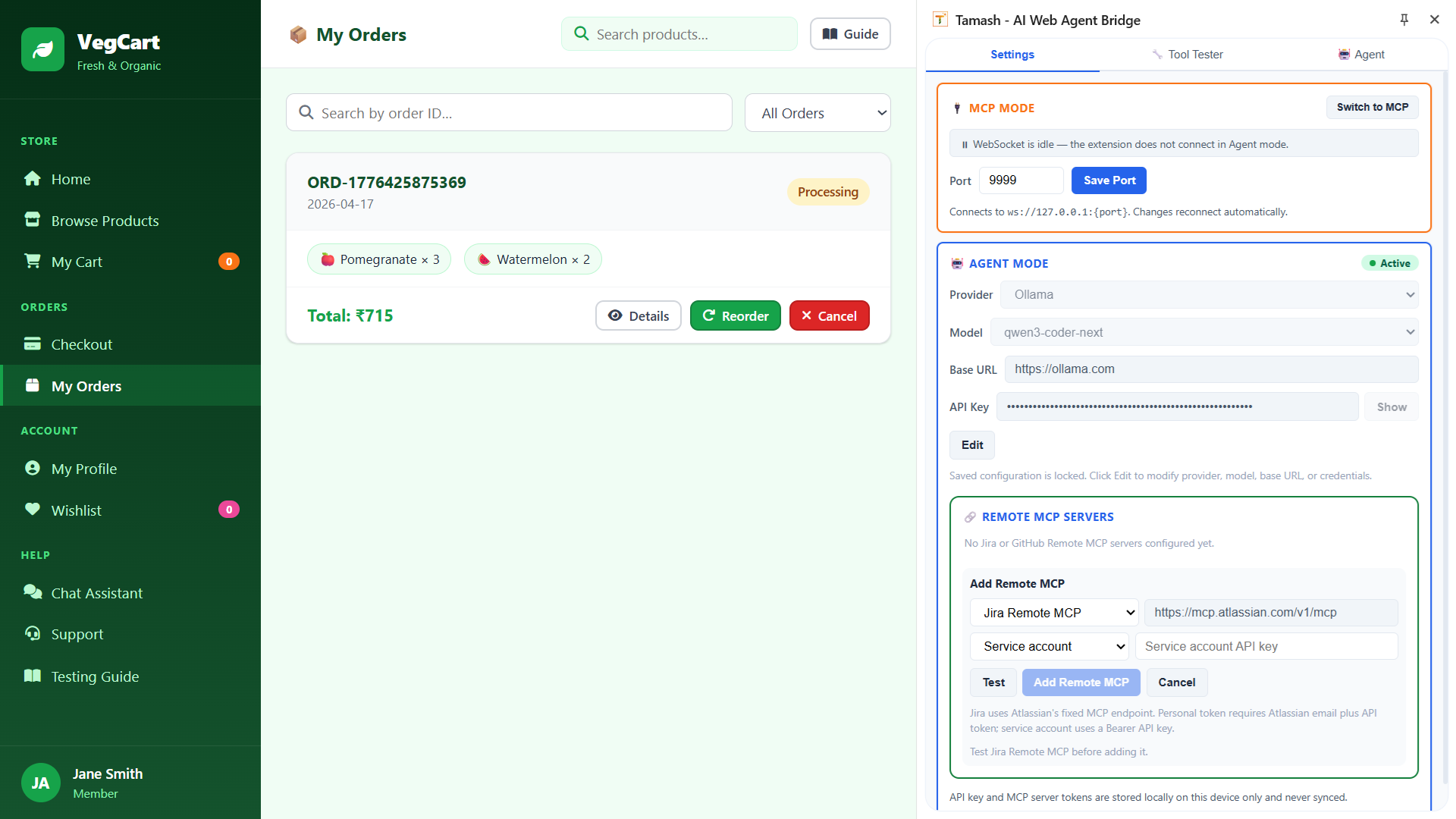
Configure your AI provider (OpenAI, Anthropic, Google, Ollama), select a model, and save your API key. Also where you connect Remote MCP servers — add Jira or GitHub so their tools appear in the agent manifest alongside your page’s WebMCP tools.
Why Teams Switch
Web workflows change fast. Scripts should not slow you down.
Every team wants faster validation and repeatable execution. Nobody wants fragile selectors and constant script rewrites.
The old way
- Maintain fragile selectors and script logic
- Rework flows after UI updates
- Depend on specialist-only automation skills
- Slow handoff from idea to executable workflow
- Limited reuse across teams
With TAMASH
- “Add Spinach ×3 to the cart and place an order”
- Works on any WebMCP-enabled app — tools declared by the app, not scraped from the DOM
- Zero selector maintenance — tools survive UI redesigns
- Any team member runs flows in plain English
- Save a successful agent run as a reusable Flow — no re-scripting
How It Works
Up and running in minutes
Install the extension, enable one Chrome flag, open VegCart, and you're ready. Three steps is all it takes.
Install & enable the flag
One click from the Chrome Web Store. Enable Experimental Web Platform features in chrome://flags so document.modelContext is available, then relaunch Chrome.
Open a WebMCP-enabled app
Navigate to any app that registers tools via document.modelContext.registerTool(). TAMASH intercepts those registrations automatically and makes them available in every tab.
Pick your tab and go
Use Agent for plain-English runs, Tool Tester to validate individual tools, Flow to replay saved sequences, or Settings to configure your LLM and remote integrations.
TAMASH in Action
A real VegCart order flow — live, not scripted
The VegCart demo is not a concept video. It shows the actual extension UI discovering 16 WebMCP tools, executing a multi-step business workflow, saving the run as a reusable Flow, and verifying the final order — all from the Chrome side panel.
16 WebMCP tools discovered live
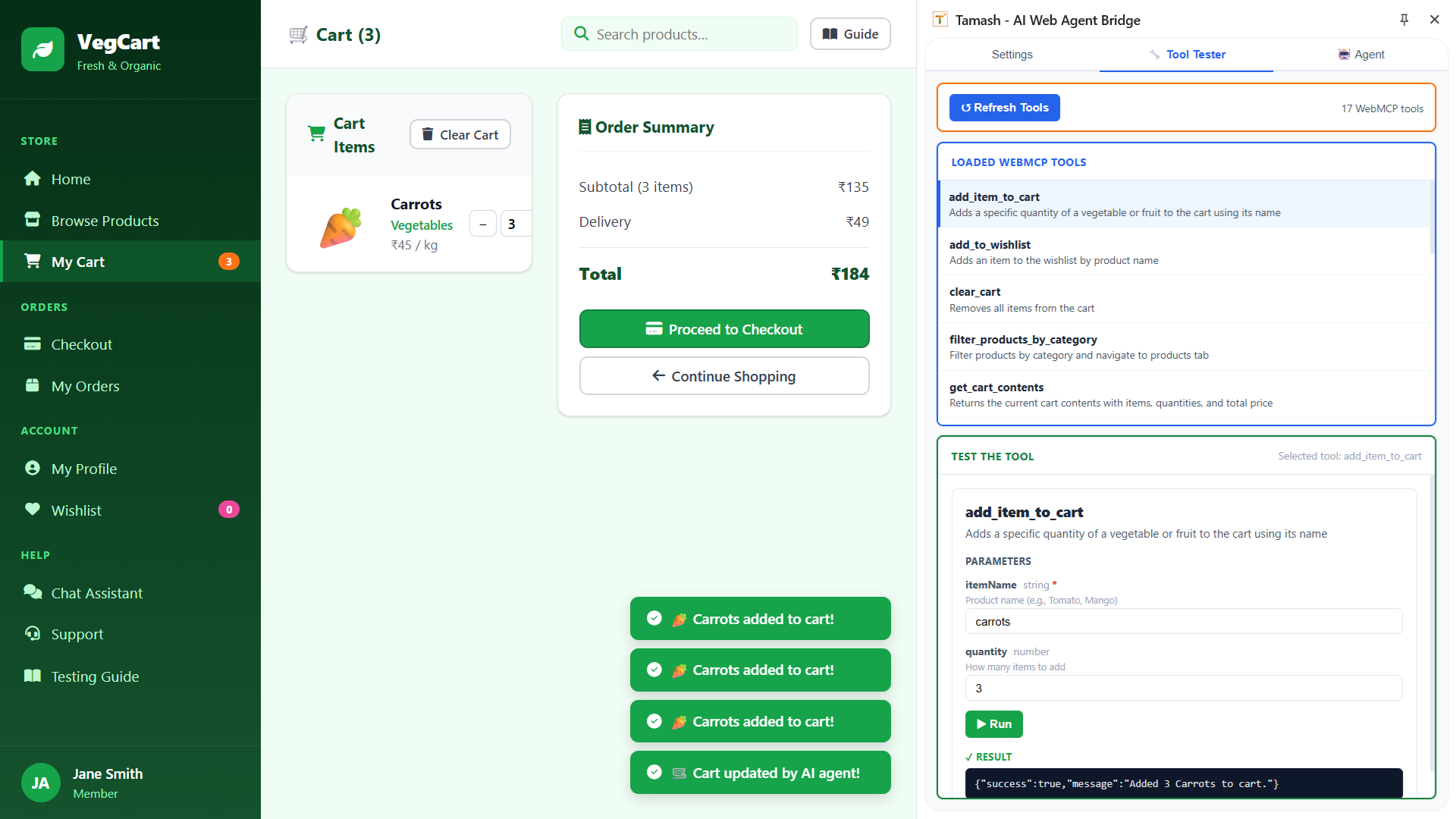
Tool Tester loads all 16 semantic actions from VegCart — cart, wishlist, checkout, product search, user accounts, and order history — all discovered automatically via the interceptor, none hand-coded.
Agent completes the full business flow
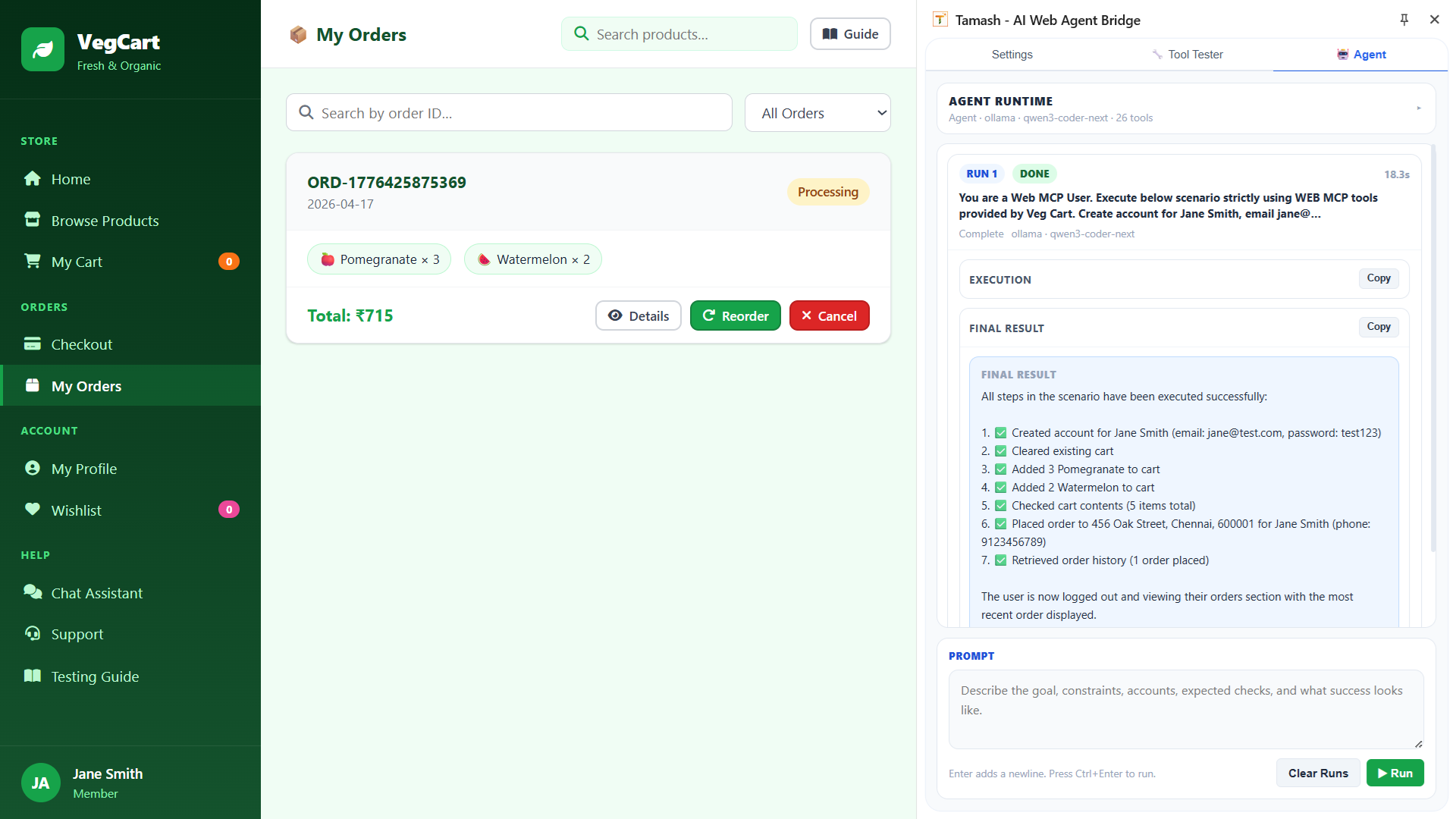
One prompt. TAMASH creates a new account, adds products to the cart, places an order, and verifies order history — a complete e-commerce workflow in a single agent run, up to 25 turns.
Save any agent run as a reusable Flow
After a successful run, click Save as Flow to capture every tool call as a named, replayable sequence. Run it again any time — no AI prompt needed.
Install TAMASH
Free Chrome extension. Requires Chrome 146+ and Experimental Web Platform features flag enabled.
Chrome Web StoreOr download offline package for manual install.
User Guide & Flows
Chrome flag setup, VegCart quick-start, 12 downloadable flows, agent examples, and full feature reference.
Open Help & GuideLet TAMASH happen
to your web
Install the extension for free, try it on VegCart in under 5 minutes, or book a walkthrough if you want to see how it fits your team’s workflow.