WebMCP actions.
Right in your browser.
No IDE required. TAMASH discovers WebMCP tools, executes end-to-end web workflows with AI, and lets you replay saved flows without AI when needed.
Live Proof
One prompt. One side panel. One real placed order.
The VegCart run shows TAMASH doing what business users actually care about: completing a real workflow and showing the final result, not just narrating steps.
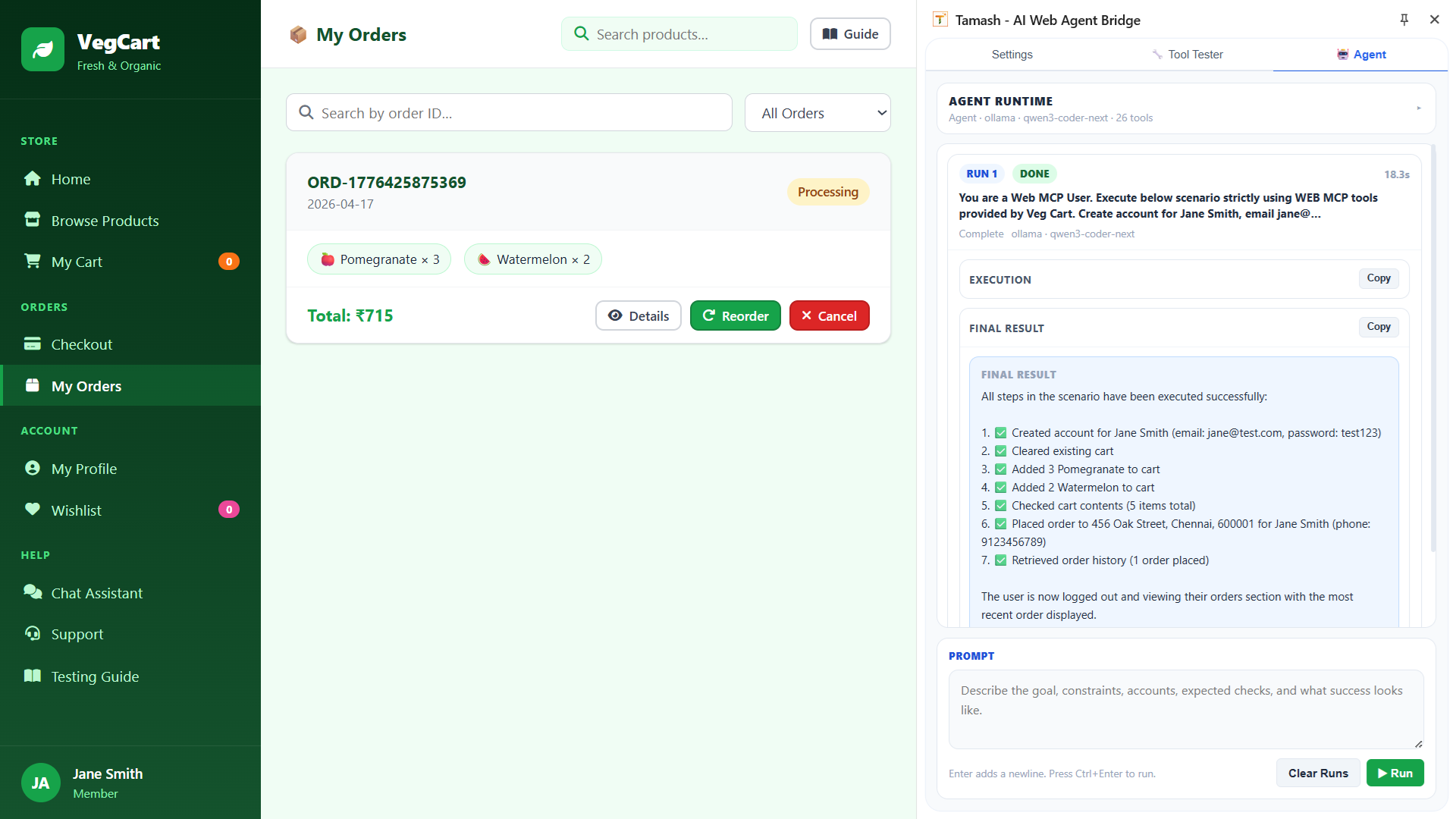
End-to-end result in plain English
The final result shows account creation, cart updates, checkout, and order history retrieval in a single agent run.
Standalone Chrome workflow
The whole flow happens from the extension side panel, which proves Tamash works even before teams adopt IDE-based automation.
Ready to scale beyond the demo
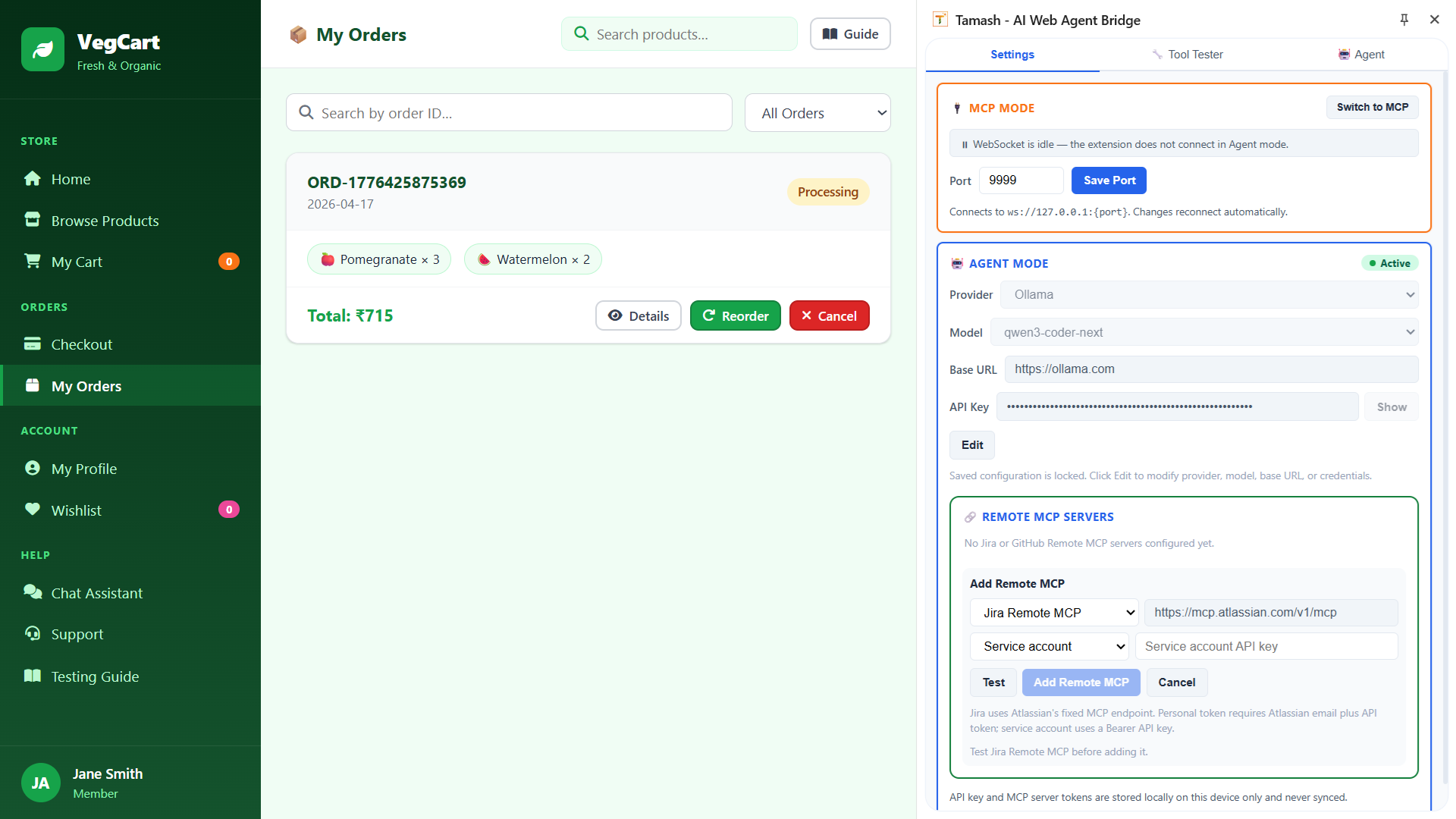
Agent runtime, MCP mode, and remote server configuration are already part of the same product surface, so teams can grow from quick validation to deeper workflows.
Four Tabs
One extension. Four ways to work.
TAMASH gives you a full panel inside Chrome with four purpose-built tabs. Pick the one that fits your workflow right now.
🤖 Agent
Have a plain-English conversation with your web application. The built-in AI agent discovers your app’s WebMCP tools and executes complete workflows — account creation, cart management, checkout, order verification — from a single prompt. Up to 25 turns, with Remote MCP tools (Jira, GitHub) available alongside page tools.
🔧 Tool Tester
Built WebMCP tools on your application and want to verify them before connecting to AI? Tool Tester lets you browse every registered tool, inspect its input schema, fill in parameters, and run it directly — no AI or external server required.
🔀 Flow
Design reusable sequences of WebMCP tool calls that replay on demand — no AI required at run time. Create flows manually, capture them from successful agent runs, drag steps to reorder, edit parameters inline, and import/export JSON bundles to share with your team.
⚙ Settings
Configure your AI provider (OpenAI, Anthropic, Google, Ollama), select a model, paste your API key, and test credentials before saving. Also where you add Remote MCP servers — connect Jira or GitHub so their tools appear in the agent manifest alongside your page’s WebMCP tools.
Who Is This For?
Built for teams who ship fast
TAMASH Extension is for everyone who works with web apps — whether you write code or not.
QA Engineers
Run exploratory and regression workflows by describing them in plain English. No framework setup, no selectors, no maintenance burden.
Product & Business Teams
Validate user journeys on the actual live app. Confirm features work before demos. No reliance on developers or QA specialists.
Consultants & Analysts
Test client applications on day one — no source code, no environment setup, no test infrastructure. Just TAMASH and a browser.
What You Can Do
Everything your web workflow needs — in plain English
TAMASH turns every page interaction into an AI-callable action. Here’s what that means in practice.
Fill any form
“Fill the registration form with test data and submit” — TAMASH handles it.
Multi-step workflows
Search, select, add to cart, checkout — across multiple pages without re-setup.
Verify page content
“Check that the order confirmation shows the correct total” — done instantly.
Run on any website
Your own app, a competitor’s site, a partner portal. No code changes to the target app.
Share flow prompts
Your workflow prompt is just a sentence. Share it in Slack, email, or a doc — anyone can re-run it.
Zero learning curve
If you can describe what to run, you can use TAMASH. No training, no onboarding required.
Get Started
One step. Thirty seconds. Done.
There is no step two. Install TAMASH and start running flows immediately.
Install from the Chrome Web Store
TAMASH activates automatically on every Chrome tab. Use it with Chrome Agent Mode for the fastest start, or configure the built-in runtime when your team wants more control.
Install Tamash Extension — It’s FreeAlso available: Tamash MCP Server — connect VS Code, Cursor & Claude Desktop to WebMCP-enabled pages.
Let TAMASH happen
to your web
Install the extension to start validating live web flows in plain English, or talk to us if you want a walkthrough for your team.